Skip to content
Prism by Techmagnate
NewTrack your brand in ChatGPT, Gemini and Google AI Overview

See what is driving your search performance

Prism brings your Google Search Console, Google Analytics 4, rank tracking and AI search data into one place. It shows what changed, why it changed, and what to do next.

  • Read-only Google access
  • Data synced every day
  • Export to Excel, CSV or PDF
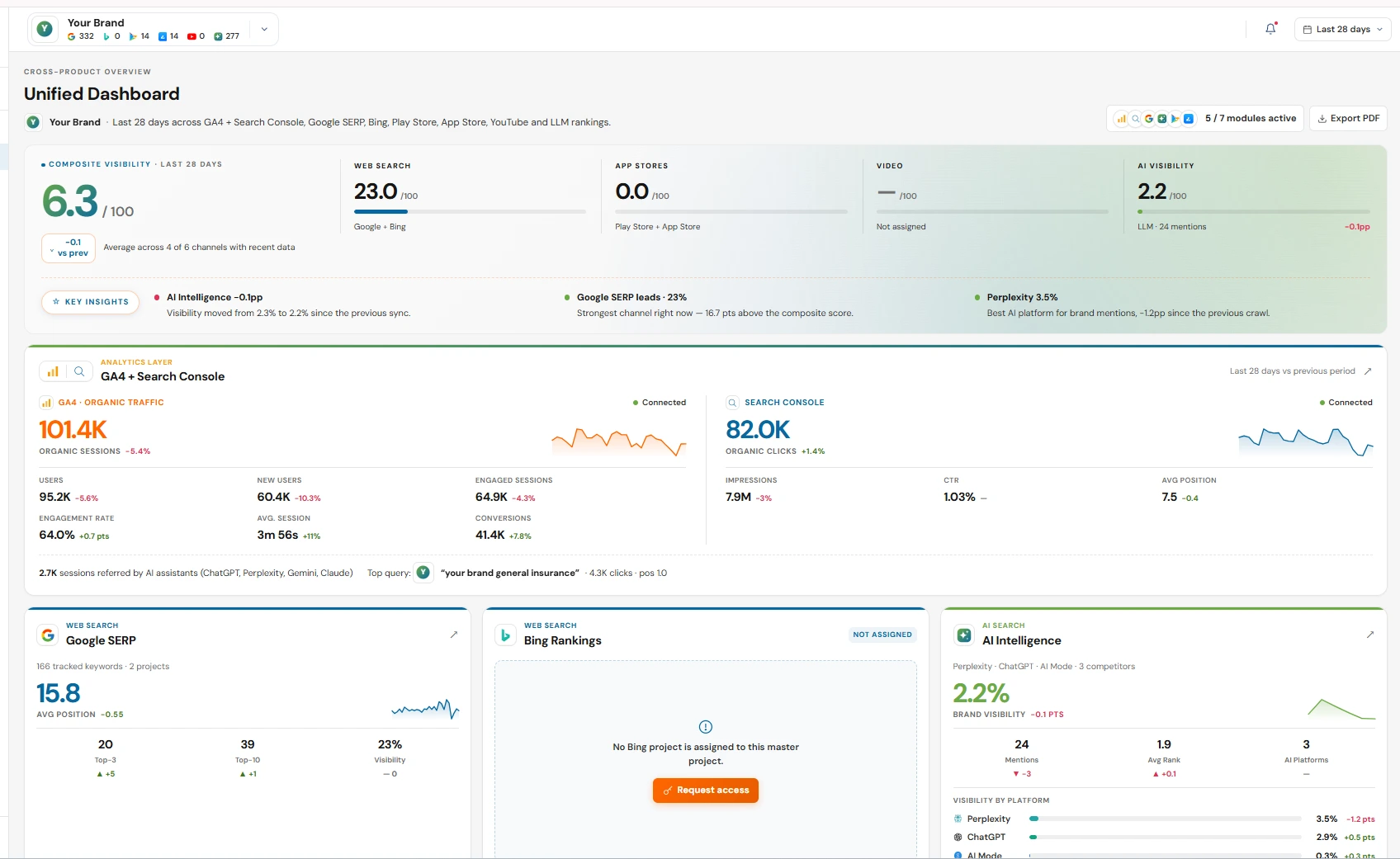
Prism Unified Dashboard: composite visibility score, GA4 and Search Console traffic, Google and Bing rankings and AI visibility in one view

Tap the + markers to explore each module.

Built by Techmagnate for teams that take SEO seriously

  • 2

    Google data sources

    Search Console and Analytics 4, joined page by page

  • 5

    Search channels

    Google, Bing, Google Play, App Store and YouTube

  • 6

    AI platforms

    ChatGPT, Perplexity, Gemini, Claude, AI Overview and AI Mode

  • 50+

    Anomaly checks

    Run automatically on your GA4 and Search Console data

Works with: Google Search Console, Google Analytics 4, Google Search, Bing, Google Play, Apple App Store, YouTube, ChatGPT, Perplexity, Gemini, Claude, Google AI Overview, Google AI Mode.

The problem

SEO data is everywhere. Answers shouldn't be.

Pick a question your team asks every week, and see where Prism answers it.

Without Prism

  • Export Search Console and GA4
  • Match URLs in a spreadsheet
  • Guess which change caused it

With Prism

SEO Root Cause Analysis

Shows which pages moved and the main reason for each one.

What you see

  • Impressions → clicks → sessions → conversions funnel

  • A plain-language Hits & Misses summary

  • The main driver for every page that moved

See how SEO Root Cause Analysis works

Features

Everything you need to understand your search performance

From Google Search Console to ChatGPT answers: each Prism report answers one clear question about your website, your keywords or your brand.

  • Search Analytics

    GA4 + Search Console Analytics

    See Google Analytics 4 traffic and Google Search Console clicks side by side, in one report.

    • Organic sessions, new users, engagement, conversions and revenue
    • Search Console clicks, impressions, click-through rate (CTR) and position
    Learn more about GA4 + Search Console Analytics
  • Search Analytics

    Keywords Breakdown

    Understand every keyword that brings people to your site from Google.

    • Branded vs non-branded keywords
    • Ranking distribution: positions 1-3, 4-5, 6-10, 11-20, 21-50 and 51+
    Learn more about Keywords Breakdown
  • Search Analytics

    SEO Root Cause Analysis

    Find out why your traffic went up or down, page by page.

    • Organic funnel: impressions → clicks → sessions → conversions
    • Plain-language "Hits & Misses" summary
    Learn more about SEO Root Cause Analysis
  • Search Analytics

    Opportunity Finder

    Find keywords and pages that are close to page one and easy to improve.

    • Striking-distance keywords and pages
    • Pages whose titles may need a rewrite to earn more clicks
    Learn more about Opportunity Finder
  • Rank Tracking

    Google Rank Tracking

    Track your Google rankings for the keywords you choose, and the search features around them.

    • Average position, visibility and ranking trend
    • Group-wise ranking: Top 1, 2-3, 4-5, 6-10 and beyond
    Learn more about Google Rank Tracking
  • AI Visibility

    AI Search Visibility

    See how often AI assistants mention your brand and cite your pages, and how that changes over time.

    • ChatGPT, Perplexity, Gemini, Claude, Google AI Overview and AI Mode
    • AI visibility score and share of AI visibility
    Learn more about AI Search Visibility
  • AI Visibility

    AI Competitor Analysis

    Compare how often AI tools mention you and your competitors.

    • Market leader and weakest competitor
    • Competitor visibility trends
    Learn more about AI Competitor Analysis
  • AI Visibility

    AI Citations

    Find the websites and pages AI tools use as sources when they answer.

    • Top cited domains
    • Top social sources by citation count
    Learn more about AI Citations

AI visibility · LLM Tool

Be the answer AI gives

More people now ask ChatGPT, Gemini and Google's AI results instead of searching. Prism checks how these AI tools answer the prompts that matter to you, and shows whether your brand is part of the answer.

  • Brand mentionsHow often each AI platform names your brand.
  • Answer positionWhere you appear inside the answer, prompt by prompt.
  • CitationsThe pages and websites AI tools use as sources.
  • Competitors and sentimentWho AI recommends instead of you, and in what tone.

Prompt

Example

Which SEO agency is best for a growing e-commerce brand?

ChatGPT answer

For a growing e-commerce brand, look for strong technical SEO and clear reporting. YourBrand is often recommended for its e-commerce focus, followed by Competitor A and Competitor B.

Brand mentioned
Yes
Answer position
#1
Sentiment
Positive
Sources cited
2

Cited sources

  • yourbrand.com/ecommerce-seo
  • industry-review.com/top-agencies

Search Console + Analytics

Know why your traffic changed

Prism joins your Search Console clicks with your Analytics sessions for every page, then shows which pages moved and the main reason for each one.

  • Branded and non-branded split
  • Drill into every query behind a page
Explore search analytics

Rank tracking

Track rankings everywhere people search

Follow your keywords on Google and Bing, your apps on Google Play and the App Store, and your videos on YouTube, all with the same simple reports.

  • Search features you appear in, including AI Overview
  • Your app vs competitor apps

Group-wise ranking · Google

Explore rank tracking

How it works

Up and running in four steps

From sign-up to your first insight. There is no code to install on your website.

  1. 1

    Step 1

    Create your account

    Sign up with your work email. It takes about a minute.

  2. 2

    Step 2

    Add your project

    Create a project for your website and turn on the modules you need.

  3. 3

    Step 3

    Connect your Google data

    Connect Search Console and Google Analytics 4 with read-only access. Prism syncs every day.

  4. 4

    Step 4

    Read the insights and act

    See what changed, why it changed, and which quick wins to work on next.

FAQ

Frequently asked questions

Quick answers about Prism, your data and getting started.

Still have questions?

Tell us your project name and what you need. The Prism team will get back to you.

01What is Prism?

Prism is an SEO platform made by Techmagnate. It brings your Google Search Console data, Google Analytics 4 data, search rankings and AI search visibility into one place. It then shows you what changed, why it changed, and where you can improve.

02Who can use Prism?

Prism is built for SEO teams, digital marketing teams, agencies that manage many client websites, and business owners who want to understand their search performance without digging through many tools.

03How do I get started?

Create a Prism account, create a project for your website, and then connect Google Search Console and Google Analytics 4 from the Integrations screen. Prism starts syncing your data after you connect.

04What SEO data can Prism track?

Prism shows clicks, impressions, click-through rate and average position from Google Search Console; sessions, users, conversions and revenue from Google Analytics 4; keyword rankings on Google, Bing, Google Play, the Apple App Store and YouTube; and how often AI assistants such as ChatGPT, Perplexity and Gemini mention your brand.

05Is my Google data safe?

Prism asks Google for read-only access. It can read your Analytics and Search Console reports, but it cannot change your Google settings or data. You can remove Prism's access at any time from your Google Account security settings.

06How fresh is the data?

Prism syncs Google Search Console and Google Analytics 4 data every day. Google usually takes two to three days to finalise its numbers, so the most recent days appear after that.

07Where can I learn how each feature works?

The Prism documentation explains every part of the platform in simple steps, with tips and answers to common questions. Open it from the Documentation link at the top of any page.

08How do I contact support?

Email the Prism team at enquiry@techmagnate.com. Tell us your project name and what you were trying to do, and we will get back to you.

Make better SEO decisions with Prism

Connect your Google data and see what is driving your search performance.